Subscribing to AutoScriptOne
When you are ready to start your two-week free trial of AutoScriptOne, log in to your AutoScript.ai online account. Don't have an AutoScript.ai account yet? Open https://www.autoscript.ai/ and create your free account. We use two-factor authentication so you will have to verify your cell phone number and your email address.
Begin by adding a payment method to your account. Your card will not be charged until the end of the two-week free trial.
Click on your Credit Balance to open your Billing Account Details page and click on the card that says Add New Method.
After you have added your payment method, you can click on the AutoScriptOne card and add your subscription
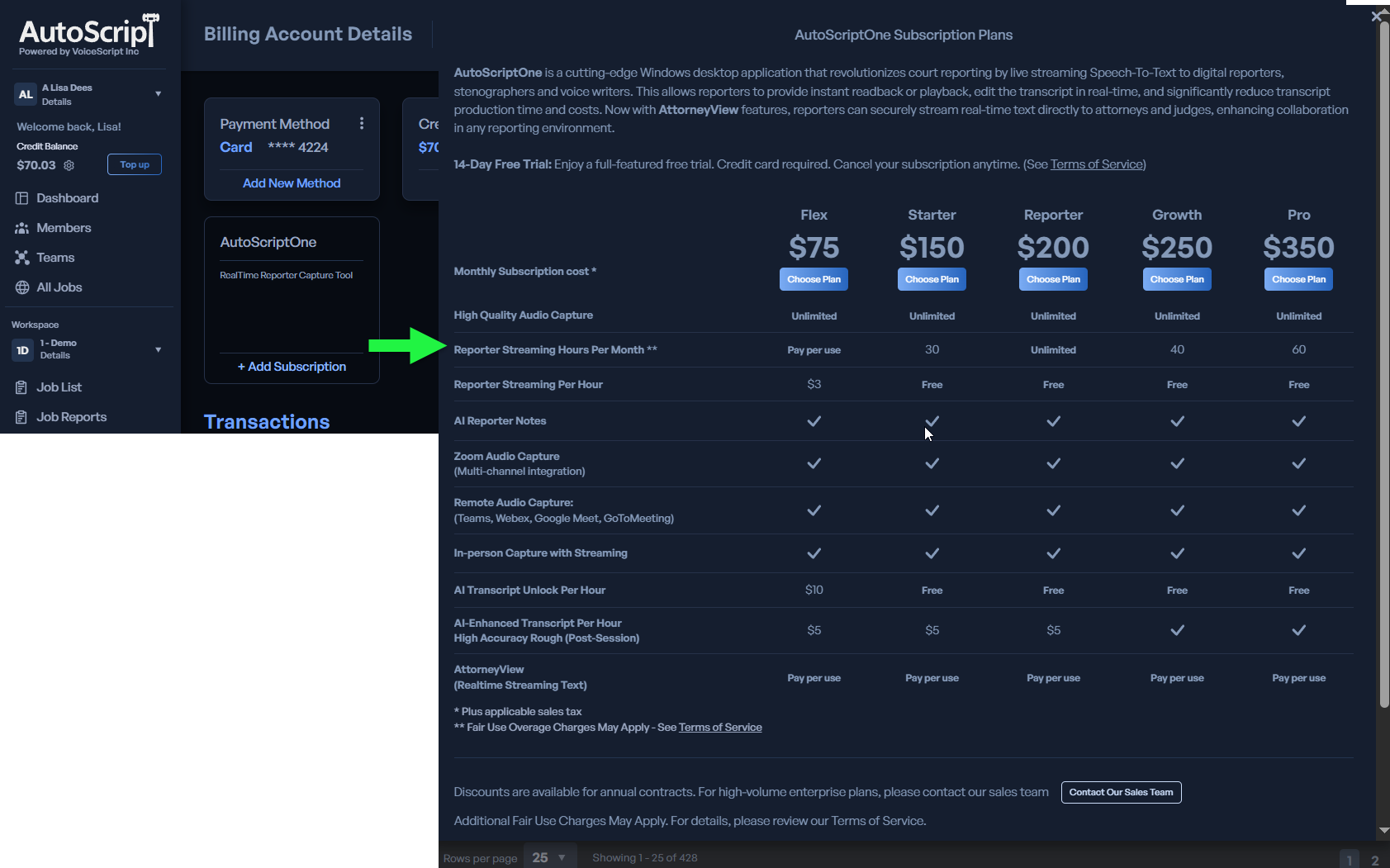
Now, check your email confirming your new subscription. This email will contain a link to download your new AutoScriptOne installer. Don't see the email? Check your junk or spam folders.
Want to learn how to use your AutoScriptOne subscription? Try one of these tutorial videos.
How to use the Flex subscription for audio-only recording and traditional annotating
Or to include the realtime text subscriptions
If you find that you require technical assistance, please reach out to VoiceScript Support and open a support ticket. Request support
Or call us at 786-809-0600.